Integrating AWS external storage with Lightico allows completed documents from a collaboration session to be stored securely in your own AWS environment. This gives you greater control over data ownership, retention, and compliance, while keeping documents easily accessible for downstream systems and processes. By storing documents directly in AWS, you can align Lightico sessions with your existing storage, security, and audit practices without adding manual steps.
To configure the integration:
From Admin Center, go to Integration hubs and click the Amazon hub.
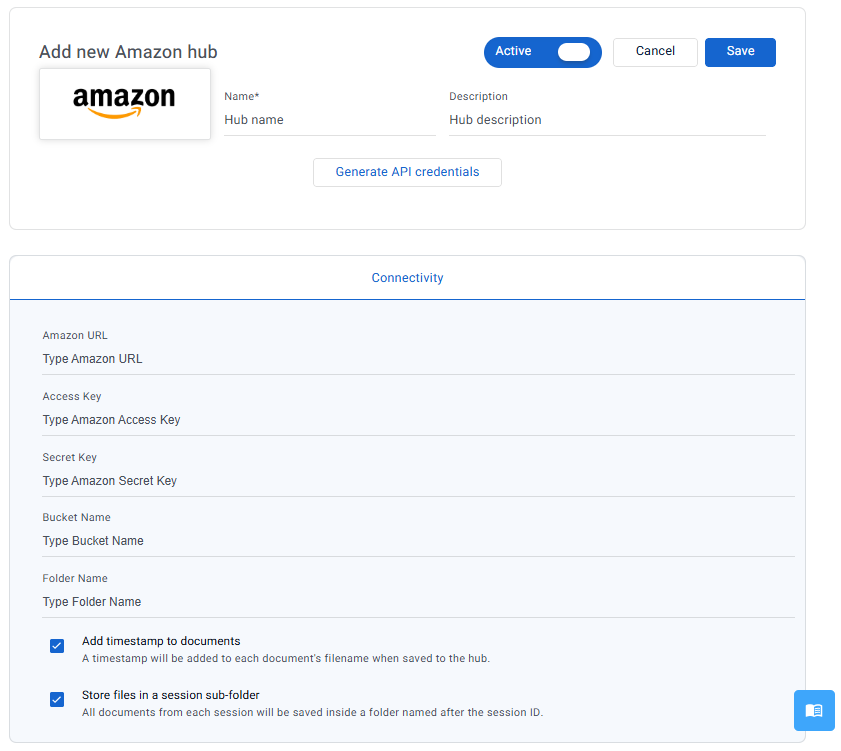
Enter a name and description (optional) for the hub.
Enter all your AWS credentials: URL, access key, and secret key.
Enter the storage location parameters for Lightico documents: bucket name and folder name.
By default, Lightico adds a timestamp to the filename of all saved files.
If you have another way to create a unique filename, you can deselect Add timestamp to documents.By default, all documents from each session are saved inside a folder named after the session ID. If you require all documents to be stored directly in the root folder, deselect Store files in a session subfolder.
Click Save.